State Management in React Native: Context vs Zustand vs Redux
A comprehensive comparison of state management solutions for React Native, with real-world examples showing when to use each approach.
The State Management Spectrum
Choosing the right state management solution is critical for React Native apps. There's no one-size-fits-all answer—the best choice depends on your app's complexity, team size, and specific requirements.
| Solution | Best For | Learning Curve | Bundle Size |
|---|---|---|---|
| Context API | Small apps, theme/auth | Low | 0kb (built-in) |
| Zustand | Medium apps, simple global state | Low | ~1kb |
| Redux Toolkit | Large apps, complex state | Medium-High | ~12kb |
| Jotai/Recoil | Atomic state needs | Medium | ~3-5kb |
Context API: When Simple is Enough
Context is perfect for infrequently changing data like theme, authentication, or user preferences. However, it causes re-renders of all consumers when any value changes.
// Good use case: Auth context
interface AuthContextType {
  user: User | null;
  login: (credentials: Credentials) => Promise<void>;
  logout: () => void;
}

const AuthContext = createContext<AuthContextType | null>(null);

export function AuthProvider({ children }: { children: ReactNode }) {
  const [user, setUser] = useState<User | null>(null);

  const login = useCallback(async (credentials: Credentials) => {
    const user = await authApi.login(credentials);
    setUser(user);
  }, []);

  const logout = useCallback(() => {
    setUser(null);
    authApi.logout();
  }, []);

  const value = useMemo(
    () => ({ user, login, logout }),
    [user, login, logout]
  );

  return <AuthContext.Provider value={value}>{children}</AuthContext.Provider>;
}
Zustand: The Sweet Spot
Zustand offers a minimal API with excellent performance. It's my go-to for most React Native apps. No providers, no boilerplate, just clean state management.
import { create } from 'zustand';
import { persist, createJSONStorage } from 'zustand/middleware';
import AsyncStorage from '@react-native-async-storage/async-storage';

interface CartStore {
  items: CartItem[];
  addItem: (item: CartItem) => void;
  removeItem: (id: string) => void;
  clearCart: () => void;
}

export const useCartStore = create<CartStore>()(
  persist(
    (set) => ({
      items: [],
      addItem: (item) =>
        set((state) => ({
          items: [...state.items, item],
        })),
      removeItem: (id) =>
        set((state) => ({
          items: state.items.filter((item) => item.id !== id),
        })),
      clearCart: () => set({ items: [] }),
    }),
    {
      name: 'cart-storage',
      storage: createJSONStorage(() => AsyncStorage),
    }
  )
);

// Usage in component
function CartScreen() {
  const items = useCartStore((state) => state.items);
  const removeItem = useCartStore((state) => state.removeItem);
  // Component only re-renders when items change
}
Redux Toolkit: For Complex Apps
Redux shines in large apps with complex state interactions, time-travel debugging needs, or teams already familiar with it. Modern Redux Toolkit eliminates most boilerplate.
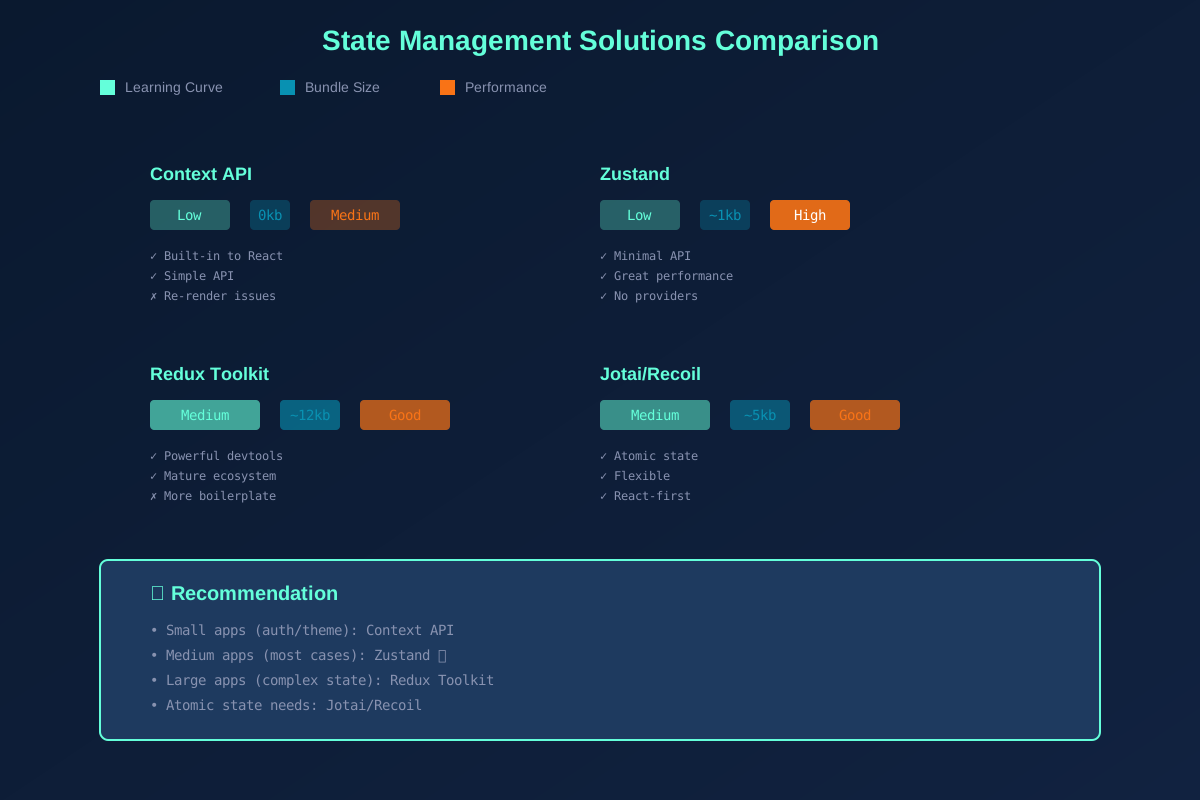
State Management Solutions Comparison Chart
Decision Framework
Start with Context for auth/theme. Graduate to Zustand when you need more. Only reach for Redux when you have truly complex state requirements, multiple teams, or need advanced debugging. Don't over-engineer—you can always migrate later.