Common React Native Mistakes That Hurt Production Apps
Learn from real-world failures: critical mistakes developers make in React Native apps and how to avoid them before they reach production.
Mistake #1: Not Handling Network Failures
Mobile networks are unreliable. Apps must gracefully handle offline states, timeouts, and partial failures. I've seen production apps crash because they assumed network requests always succeed.
// ❌ Bad: No error handling
async function fetchUserData() {
  const response = await fetch('/api/user');
  const data = await response.json();
  setUser(data);
}

// ✅ Good: Comprehensive error handling
async function fetchUserData() {
  try {
    const controller = new AbortController();
    const timeoutId = setTimeout(() => controller.abort(), 10000);

    const response = await fetch('/api/user', {
      signal: controller.signal,
    });

    clearTimeout(timeoutId);

    if (!response.ok) {
      throw new Error(`HTTP ${response.status}: ${response.statusText}`);
    }

    const data = await response.json();
    setUser(data);
    setError(null);
  } catch (err) {
    if (err.name === 'AbortError') {
      setError('Request timeout - please try again');
    } else if (!navigator.onLine) {
      setError('No internet connection');
    } else {
      setError('Failed to load user data');
      Sentry.captureException(err);
    }
  }
}
Mistake #2: Ignoring Android Back Button
Android's back button behavior must be explicitly handled. Failing to do so creates a frustrating user experience and app store rejections.
import { BackHandler } from 'react-native';

function useBackHandler(handler: () => boolean) {
  useEffect(() => {
    // Return true to prevent default back behavior
    BackHandler.addEventListener('hardwareBackPress', handler);

    return () => {
      BackHandler.removeEventListener('hardwareBackPress', handler);
    };
  }, [handler]);
}

// Example: Confirm before exiting
function App() {
  useBackHandler(() => {
    if (hasUnsavedChanges) {
      Alert.alert(
        'Discard changes?',
        'You have unsaved changes.',
        [
          { text: 'Cancel', style: 'cancel' },
          { text: 'Discard', onPress: () => navigation.goBack() },
        ]
      );
      return true; // Prevent default
    }
    return false; // Allow default
  });
}
Mistake #3: Memory Leaks from Animations
Animated values that aren't cleaned up cause memory leaks and performance degradation over time. This is especially problematic in long-running apps.
| Leak Source | Impact | Fix |
|---|---|---|
| Animated.Value listeners | Memory accumulation | Remove listeners in cleanup |
| Running animations on unmount | Crashes, warnings | Stop animations in useEffect cleanup |
| Reanimated worklets | Native memory leaks | Cancel animations properly |
// ❌ Bad: Animation continues after unmount
function FadeInView({ children }) {
  const fadeAnim = useRef(new Animated.Value(0)).current;

  useEffect(() => {
    Animated.timing(fadeAnim, {
      toValue: 1,
      duration: 1000,
      useNativeDriver: true,
    }).start();
  }, []);

  return <Animated.View style={{ opacity: fadeAnim }}>{children}</Animated.View>;
}

// ✅ Good: Animation cleaned up on unmount
function FadeInView({ children }) {
  const fadeAnim = useRef(new Animated.Value(0)).current;

  useEffect(() => {
    const animation = Animated.timing(fadeAnim, {
      toValue: 1,
      duration: 1000,
      useNativeDriver: true,
    });

    animation.start();

    return () => {
      animation.stop();
      fadeAnim.setValue(0);
    };
  }, [fadeAnim]);

  return <Animated.View style={{ opacity: fadeAnim }}>{children}</Animated.View>;
}
Mistake #4: Not Testing on Real Devices
Simulators/emulators don't represent real-world conditions. Always test on physical devices, especially lower-end Android devices which represent the majority of users globally.
| Test Scenario | Why It Matters | Real Device Only |
|---|---|---|
| Camera/Sensors | Hardware integration bugs | ✓ |
| Low memory | Crashes on budget devices | ✓ |
| Slow network | Loading states, timeouts | ✓ |
| Push notifications | User engagement critical | ✓ |
Mistake #5: Blocking the Main Thread
Heavy computations on the JS thread freeze the UI. Move expensive work to background threads or native modules:
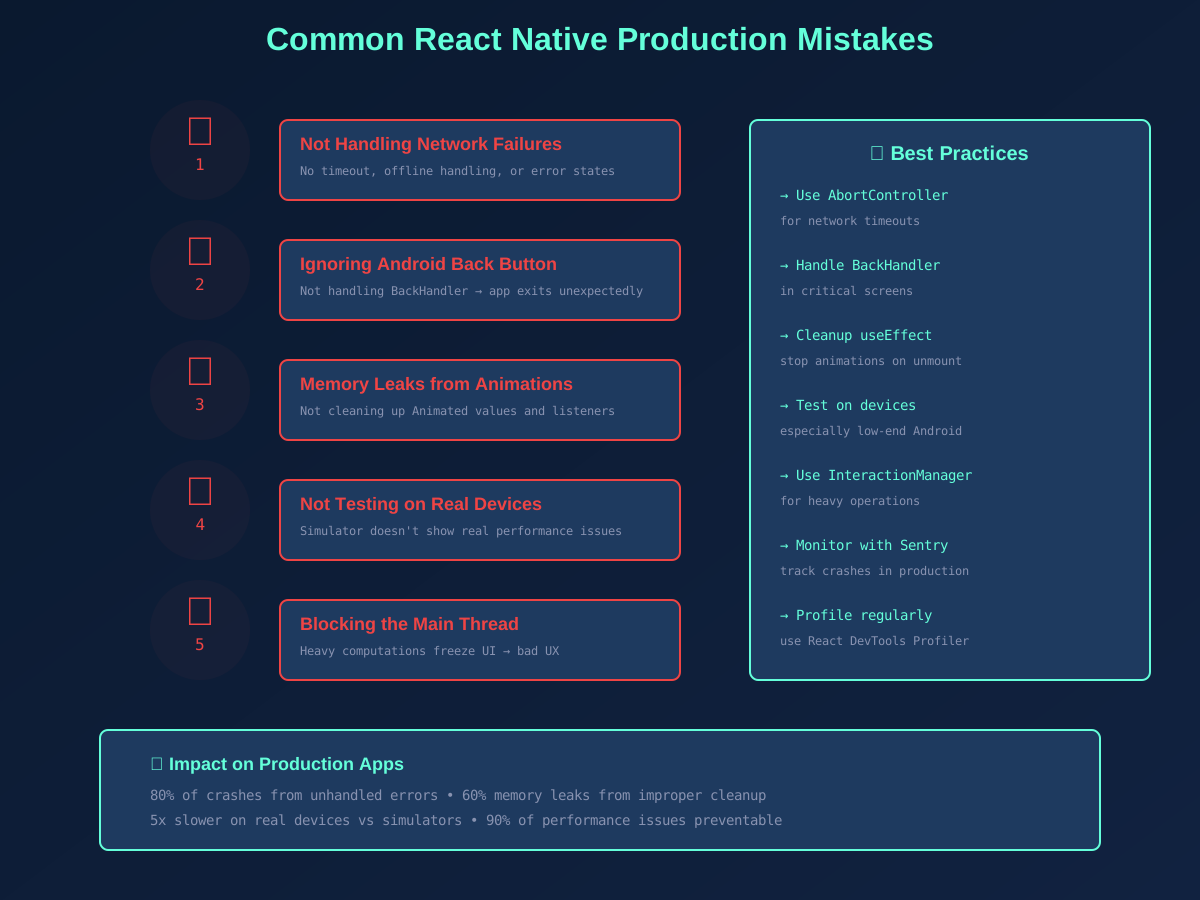
React Native Production Mistakes Infographic
Prevention is Better Than Cure
These mistakes are preventable with proper code reviews, testing, and monitoring. Implement error boundaries, use crash reporting (Sentry/Crashlytics), and monitor performance metrics in production. Your users will thank you.