Navigation, Deep Linking, and App Lifecycle in React Native
Master React Navigation, implement deep linking, and handle app lifecycle events to create seamless navigation experiences in your React Native apps.
Modern Navigation Architecture
React Navigation has evolved into a robust, production-ready solution. Understanding its navigation patterns is essential for building intuitive mobile apps.
| Navigator | Use Case | Example |
|---|---|---|
| Stack | Hierarchical screens | Product List → Product Detail |
| Tab | Top-level sections | Home, Search, Profile tabs |
| Drawer | Side menu navigation | Settings, Account menu |
| Modal | Temporary overlays | Filters, Share sheets |
Type-Safe Navigation
Always use TypeScript for navigation parameters. It prevents runtime errors and improves developer experience:
// Define your navigation types
export type RootStackParamList = {
  Home: undefined;
  ProductDetail: { productId: string };
  Cart: { fromCheckout?: boolean };
  Profile: { userId: string };
};

// Typed navigation prop
import { NativeStackNavigationProp } from '@react-navigation/native-stack';

type ProductDetailScreenProps = {
  navigation: NativeStackNavigationProp<RootStackParamList, 'ProductDetail'>;
  route: RouteProp<RootStackParamList, 'ProductDetail'>;
};

function ProductDetailScreen({ route, navigation }: ProductDetailScreenProps) {
  const { productId } = route.params; // Type-safe!

  const navigateToCart = () => {
    navigation.navigate('Cart', { fromCheckout: true }); // Type-checked!
  };

  return <View>...</View>;
}
Deep Linking Configuration
Deep linking allows users to open specific screens from external links. This is critical for marketing campaigns, push notifications, and user retention:
// app.json - Configure URL schemes
{
  "expo": {
    "scheme": "myapp",
    "android": {
      "intentFilters": [
        {
          "action": "VIEW",
          "data": [
            { "scheme": "https", "host": "myapp.com" },
            { "scheme": "myapp" }
          ],
          "category": ["BROWSABLE", "DEFAULT"]
        }
      ]
    },
    "ios": {
      "associatedDomains": ["applinks:myapp.com"]
    }
  }
}

// Navigation configuration
const linking = {
  prefixes: ['myapp://', 'https://myapp.com'],
  config: {
    screens: {
      Home: '',
      ProductDetail: 'product/:productId',
      Cart: 'cart',
      Profile: 'user/:userId',
    },
  },
};

// Now these URLs work:
// myapp://product/123
// https://myapp.com/product/123
// https://myapp.com/user/abc-def
Handling App Lifecycle Events
Properly handling app state changes is crucial for performance, user experience, and data consistency:
import { useEffect, useRef } from 'react';
import { AppState, AppStateStatus } from 'react-native';

function useAppLifecycle() {
  const appState = useRef(AppState.currentState);

  useEffect(() => {
    const subscription = AppState.addEventListener(
      'change',
      (nextAppState: AppStateStatus) => {
        if (
          appState.current.match(/inactive|background/) &&
          nextAppState === 'active'
        ) {
          // App has come to foreground
          console.log('App foregrounded - refresh data');
          refreshData();
        }

        if (nextAppState.match(/inactive|background/)) {
          // App went to background
          console.log('App backgrounded - save state');
          saveUserData();
        }

        appState.current = nextAppState;
      }
    );

    return () => {
      subscription.remove();
    };
  }, []);
}

// Use in your root component
function App() {
  useAppLifecycle();
  return <NavigationContainer>...</NavigationContainer>;
}
Navigation State Persistence
Persist navigation state so users return to where they left off:
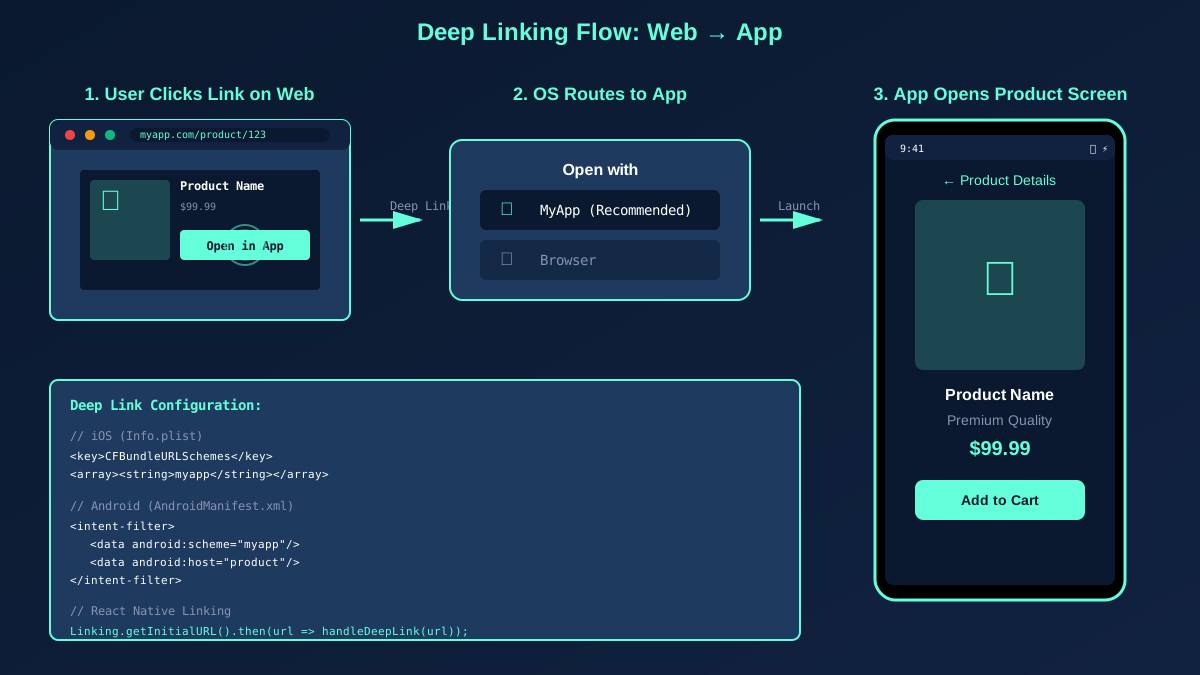
Deep Linking Demo: From Web to App Screen
Mastering navigation and deep linking creates seamless user experiences and opens powerful marketing opportunities. Invest time in getting these fundamentals right.