Optimizing React Native Performance in Production
Discover practical techniques to diagnose and fix performance bottlenecks in React Native apps, from JS thread optimization to native module profiling.
Understanding React Native's Threading Model
React Native runs three main threads: the UI thread (native), the JavaScript thread, and the shadow thread (layout calculations). Performance issues arise when any of these threads become blocked.
| Thread | Purpose | Common Bottlenecks |
|---|---|---|
| JavaScript | Business logic, state updates | Heavy computations, large re-renders |
| UI (Main) | Native rendering | Complex native views, animations |
| Shadow | Layout calculations | Deep view hierarchies |
Profiling Tools You Must Know
Before optimizing, you need to measure. Use these tools to identify bottlenecks:
// Enable performance monitor in dev
import { PerformanceObserver } from 'react-native';

// React DevTools Profiler
import { Profiler } from 'react';

function onRenderCallback(
  id, phase, actualDuration, baseDuration, startTime, commitTime
) {
  console.log(`${id}'s ${phase} phase:`);
  console.log(`Actual duration: ${actualDuration}ms`);
}

<Profiler id="ProductList" onRender={onRenderCallback}>
  <ProductList />
</Profiler>
List Rendering Optimization
FlatList is your friend, but only if used correctly. Here are critical optimizations:
<FlatList
  data={items}
  // Critical: Prevent full re-renders
  keyExtractor={(item) => item.id}

  // Virtualization settings
  initialNumToRender={10}
  maxToRenderPerBatch={10}
  windowSize={5}

  // Performance props
  removeClippedSubviews={true}
  updateCellsBatchingPeriod={50}

  // Memoized render
  renderItem={renderItem}
  getItemLayout={(data, index) => ({
    length: ITEM_HEIGHT,
    offset: ITEM_HEIGHT * index,
    index,
  })}
/>

// Memoize render function
const renderItem = useCallback(({ item }) => (
  <ProductCard product={item} />
), []);
Image Optimization Strategies
Images are often the biggest performance killer. Implement aggressive optimization:
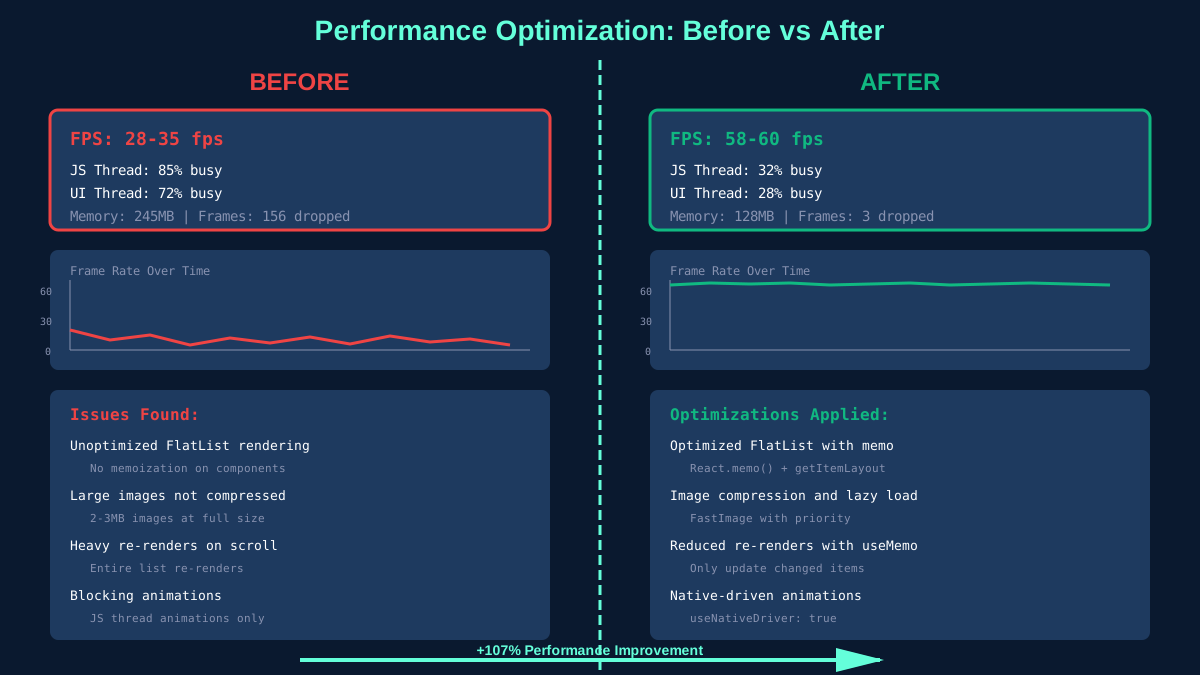
Before/After Performance Optimization
Memory Leaks: The Silent Killer
Memory leaks in React Native often come from event listeners, timers, and subscriptions. Always clean up:
useEffect(() => {
  // Subscribe
  const subscription = eventEmitter.addListener('event', handler);

  // Always cleanup
  return () => {
    subscription.remove();
  };
}, []);

// Use AbortController for fetch
useEffect(() => {
  const controller = new AbortController();

  fetch(url, { signal: controller.signal })
    .then(handleData)
    .catch(handleError);

  return () => controller.abort();
}, [url]);
Performance optimization is a continuous process. Profile regularly, optimize the biggest bottlenecks first, and always measure the impact of your changes.